
 Preview
Paycheck Budget Planner
Match every bill to the paycheck that pays it.
- Instant Safe-to-Spend balance
- Bills mapped to the exact paycheck
- Weekly, bi-weekly, semi-monthly or monthly pay
- Debt snowball + sinking funds
Instant digital download · Opens in Google Sheets or Excel
Instant
download
download
Sheets &
Excel
Excel
Video
walkthrough
walkthrough
What's inside
Everything you get, at a glance
Safe to Spend
Instantly see what is truly available after bills, savings and debt.
Bill-to-paycheck mapping
Assign every bill to a specific paycheck so you are never short before payday.
Split large bills
Break heavy payments like rent or a mortgage across multiple pay periods.
Debt snowball
Automated milestones and an estimated debt-free date.
Visual sinking funds
Save steadily for holidays, vacations and irregular expenses.
Automated visuals
Clean charts and colour-coded progress bars do the maths for you.
See it in action
Watch before you buy
Short previews and the full walkthrough, so you know exactly what you are getting.
See it in actionShort looping preview, no sound
A closer lookShort looping preview, no sound
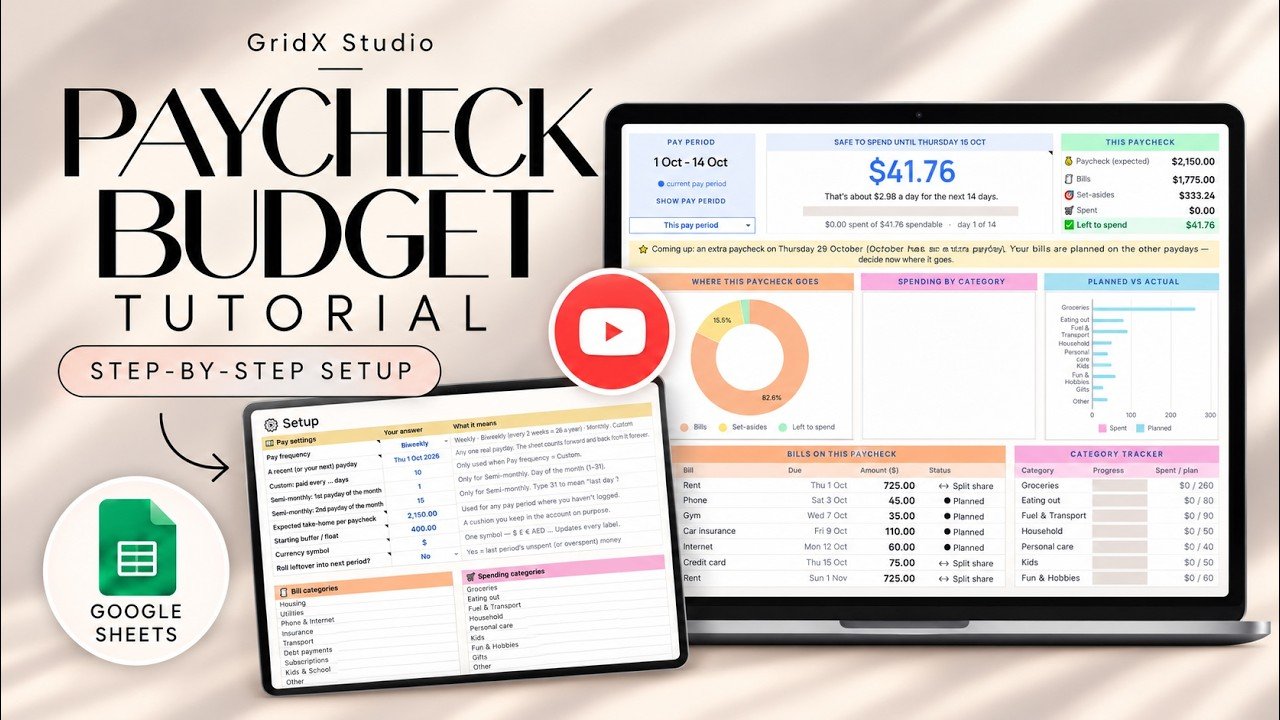
Full video walkthroughEvery tab explained on the GridX Studio YouTube channel
Full details
The complete listing, organised
1About this planner
Take control of your money with this Paycheck Budget Spreadsheet for Google Sheets & Excel. Track bills, expenses, sinking funds & debt payoff with an instant Safe-to-Spend balance!Stop stressing about monthly totals that don't match your real bank balance. This paycheck budget aligns your bills directly to the paychecks that cover them—so you always know exactly how much you can safely spend right now.
2Why You’Ll Love This Planner
- Clear "Safe to Spend" Amount: Instantly see what is truly available after accounting for bills, savings, and debt.
- Bill-to-Paycheck Mapping: Never get caught short before payday—assign every bill to a specific check.
- Split Large Bills: Break heavy payments (like rent or mortgage) across multiple pay periods.
- Debt Snowball System: Keep momentum going with automated milestones and an estimated debt-free date.
- Visual Sinking Funds: Save systematically for vacations, holidays, and irregular expenses.
- Automated Visuals: Clean charts and color-coded progress bars calculate everything for you.
3Supports All Pay Schedules
Designed to adapt to how you get paid:
- Weekly
- Bi-weekly (every 2 weeks)
- Semi-monthly (twice a month)
- Monthly
- Custom pay schedules
4Tabs & Pages Included
- Safe-to-Spend Dashboard (Overview of your financial health)
- Paycheck Budget Planner (Pay period breakdowns)
- Bill Tracker & Due Date Calendar
- Daily Expense & Spending Tracker
- Cash-Flow Forecast Calendar
- Sinking Funds & Savings Goal Tracker
- Debt Snowball Payoff Calculator
- Annual Overview (Year-at-a-glance dashboard)
5What You Receive
- Google Sheets Template (instant copy link)
- Microsoft Excel File (.xlsx download)
- @@
START HERE PDF
with links & instructions
- Comprehensive Illustrated User Guide
- Full Step-by-Step Video Tutorial
FAQ
Good to know
?How do I get the spreadsheet?
You buy it on Etsy and download it instantly. The listing includes step-by-step instructions to open or copy it into Google Sheets or Excel.
?Do I need Excel or Google Sheets?
Either one works. Use Google Sheets for free in your browser, or open the file in Microsoft Excel.
?Is there a video tutorial?
Yes. Each planner has a video walkthrough, and you can watch it right here on the page.
?Is this a physical product?
No. It is a digital download, so nothing is shipped.
?Where can I ask a question?
Message GridX Studio on Etsy from the listing page and we will help.
Keep exploring
More GridX Studio planners
Ready for a calmer spreadsheet?
Get Paycheck Budget Planner on Etsy and open it in Google Sheets or Excel today.
Buy on Etsy